Choosing the Right Data Recovery Software for Recovering NAS Buffalo TeraStation TS3210DN0802 Data

Has your NAS Buffalo TeraStation TS3210DN0802 suddenly lost its network drive and you’re unsure what to do next? Did the RAID array collapse, making your files inaccessible? Is the device throwing errors during startup? Perhaps you accidentally rebuilt the RAID array or several hard drives failed at the same time?

Choosing the Right Data Recovery Software for Recovering NAS Buffalo TeraStation TS3210DN0802 Data

Buffalo TeraStation TS3210DN0802 NAS Data Recovery in 2025

In this step-by-step tutorial, we’ll show you how to rebuild your RAID and recover data from an TeraStation TS3210DN0802. We’ll walk through the most common causes of failure and demonstrate proven methods to restore files from a lost or degraded RAID array.

Choosing the Right Data Recovery Software for Recovering NAS Buffalo TeraStation TS3210DN0802 Data

RAID Recovery™ 2.8
Recover data from damaged RAID arrays inaccessible from a computer.
Download

Why Regular Data Recovery Tools Can’t Restore Files from RAID

Conventional hard drives store user data by writing it sequentially across the disk surface, which means an entire file is typically located on a single drive. In contrast, when data is written to a RAID array, each file is split into multiple fragments. These fragments are then distributed and written in sequence across all the drives in the array. Depending on the configuration, fragment sizes can range from 2 KB to 2 MB, so every file is physically stored across several disks at once.

This approach significantly increases read and write performance — after all, writing two halves of a 1 GB file to two drives simultaneously is much faster than writing the full 1 GB to a single disk. However, this same mechanism makes file recovery far more complex.

Different RAID levels use different methods to distribute and protect data. On top of that, manufacturers like Buffalo often add their own proprietary structures and variations. As a result, data can be written to disks in many different formats, and each requires a specific approach during recovery.

Are there any recommended best practices for securely storing usernames and passwords on NAS Buffalo TeraStation TS3210DN0802 devices?

Yes, there are several recommended best practices for securely storing usernames and passwords on NAS Buffalo TeraStation TS3210DN0802 devices:

  1. Change default credentials: Immediately change the default username and password provided by the manufacturer. Use strong, unique passwords that are not easily guessable.
  2. Use complex passwords: Use a combination of uppercase and lowercase letters, numbers, and special characters in your passwords. Avoid using common or easily guessable passwords.
  3. Enable two-factor authentication (2FA): Enable 2FA whenever possible. This adds an extra layer of security by requiring a second form of authentication, such as a code sent to your mobile device, in addition to the username and password.
  4. Regularly update firmware: Keep the firmware of your NAS device up to date. Manufacturers often release firmware updates that include security patches and bug fixes.
  5. Disable unnecessary services: Disable any unnecessary services or features that are not being used. This reduces the attack surface and minimizes the risk of unauthorized access.
  6. Limit access privileges: Grant access privileges only to the users or groups that require them. Restrict access to sensitive data and ensure that users have the least amount of privileges necessary to perform their tasks.
  7. Implement strong network security measures: Secure your network infrastructure by using firewalls, intrusion detection systems, and virtual private networks (VPNs). This helps protect against unauthorized access and data breaches.
  8. Regularly backup your data: Implement a regular backup strategy to ensure that your data is protected in case of hardware failure, accidental deletion, or ransomware attacks. Store backups securely, preferably off-site or in the cloud.
  9. Educate users on security best practices: Train your users on security best practices, such as creating strong passwords, avoiding phishing emails, and not sharing their credentials with anyone. Regularly remind them to follow these practices.
  10. Regularly monitor and audit access logs: Monitor access logs for any suspicious activities or unauthorized access attempts. Regularly review and audit these logs to identify any potential security issues.

By following these best practices, you can enhance the security of your usernames and passwords stored on NAS Buffalo TeraStation TS3210DN0802 devices and reduce the risk of unauthorized access or data breaches.

How to Remove Hard Disks from Your NAS and Connect Them to a PC

Although the NAS TeraStation TS3210DN0802 can be accessed over the network, you still need to remove its hard disks and connect them directly to a Windows PC. Only then can the recovery software properly scan and analyze the drives. Follow these steps:

  1. Power off the NAS and disconnect it from the power source.

    WARNING! Before removing any drives, carefully read the device manual. Improper actions may damage both the NAS enclosure and the hard disks in the RAID array.

  2. Remove the hard disks one by one, gently sliding each drive out of its slot. Remember that hard disks are highly sensitive: any impact or drop can cause serious physical damage.

  3. Label each hard disk according to its position inside the NAS. The order of the drives is crucial for correct RAID reconstruction.

  4. Connect the drives to your computer. In this video, we explain which ports you can use to connect hard disks and what to do if your PC does not have enough free connectors.

    Go to view

    How to Order Remote Data Recovery

    How to Order Remote Data Recovery

Step-by-Step Data Recovery with Hetman RAID Recovery

Hetman Raid Recovery

This program restores data from damaged RAID arrays and is fully compatible with Buffalo TeraStation TS3210DN0802. Each hard disk in the array contains technical metadata describing how files were written. When launched, Hetman RAID Recovery analyzes this metadata, automatically reconstructs the damaged array, and provides access to its contents. After that, you can browse the recovered disk and save your files. The program can also restore files that were accidentally deleted from the network drive.

Go to view
How to recover data from a Buffalo

How to recover data from a Buffalo

TeraStation TS3210DN0802 has 2 HDD slots, and it supports the following array types:

  • RAID 0;
  • RAID 1;
  • JBOD;

NAS supports:

  • exFAT, VFAT, FAT 12 / 16 / 32;
  • NTFS / ReFS;
  • APFS / HFS+;
  • Ext2 / 3 / 4 / ReiserFS / XFS / UFS / ZFS / Btrfs;
  • VMFS / HikvisionFS;

How to Safely Recover Data from Disk Images

This utility allows you to create a complete copy of a disk and work with the disk image instead of the physical drive. This approach helps protect your data from:

  • Overwriting during the recovery process;
  • Additional data loss caused by bad sectors;
  • User errors.

To create a disk image, follow these steps:

  1. Ensure you have enough free space to store the image. Its size will typically match the size of the original disk.

  2. In the main window, select the target disk and choose Tools - Save Disk. You can also select multiple disks if needed.

  3. When the Image Creation Wizard opens, select whether you want to save the entire disk or only a specific region. Adjust the settings and click Next.
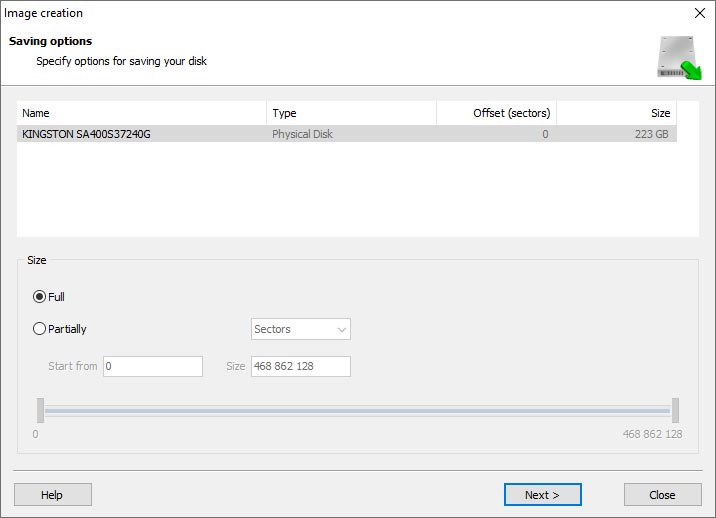
    Hetman RAID Recovery: Image Creation Wizard
  4. Choose the directory where the image will be saved. You may select any available disk connected to your PC or upload the image via FTP.
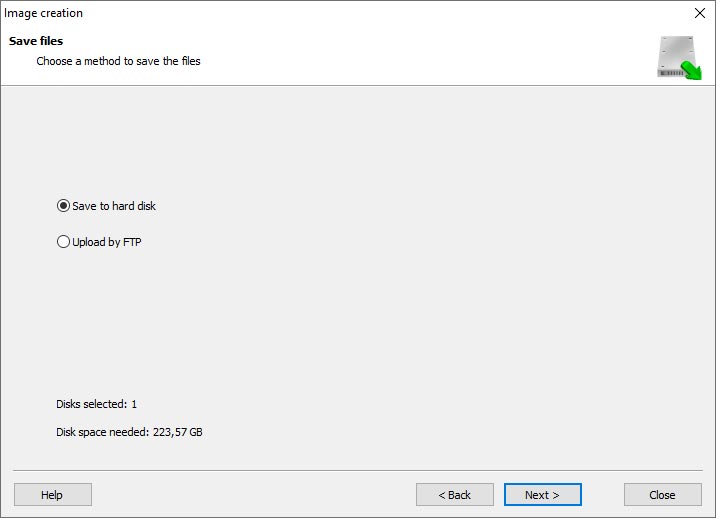
    Hetman RAID Recovery: Choose a disk or save the image via FTP

Where Are the User’s Files Actually Stored?

The Buffalo TeraStation TS3210DN0802 network-attached storage keeps OS Linux operating system files on a separate RAID 1 (mirrored) array. Usually, all NAS systems create several volumes on every hard disk, and the first of them takes up to 2 Gb of space. This is where operating system files are stored. Other volumes are united into a RAID array where user’s data is written.

RAID Recovery Software: Detailed Comparison

Product Operating system RAID controller support Supported file systems Virtual RAID controller support Data recovery from damaged RAID File preview
Hetman RAID Recovery Windows, Linux, MacOS Yes, over 100 controllers FAT, exFAT, NTFS, ReFS, APFS, HFS+, Ext4, Ext3, Ext2, ReiserFS, Btrfs, VMFS, Hikvision, XFS, UFS, ZFS Yes Yes Yes
DiskInternals RAID Recovery Windows Yes, over 10 controllers FAT, NTFS, Ext2/3/4, HFS+ No Yes Yes
R-Studio Windows, Mac, Linux Yes, over 20 controllers FAT, NTFS, Ext2/3/4, HFS+ Yes Yes Yes
UFS Explorer RAID Recovery Windows, Mac, Linux Yes, over 100 controllers FAT, NTFS, Ext2/3/4, HFS+ Yes Yes Yes
EaseUS Data Recovery Windows Yes, over 20 controllers FAT, NTFS, Ext2/3/4, HFS+ No Yes Yes
ReclaiMe Free RAID Recovery Windows Yes, over 100 controllers FAT, NTFS, Ext2/3/4, HFS+ Yes Yes Yes

Feedback

We will be happy to answer your questions!

Comments (3)

  • Hetman Software: Data Recovery
    Hetman Software: Data Recovery 9.08.2022 12:31 #
    If you want to ask a question about data recovery, from NAS TeraStation TS3210DN0802, feel free to leave a comment!
  • Rick Tilney
    Rick Tilney 1.09.2023 23:43 #
    Is it possible to recover data from a NAS Buffalo TeraStation TS3210DN0802 device that has been physically damaged by a fall or impact?
    • Hetman Software
      Hetman Software 1.09.2023 23:59 #

      Recovering data from a physically damaged device can be challenging and may require professional assistance. If the NAS Buffalo TeraStation TS3210DN0802 has been physically damaged due to a fall or impact, there is a possibility that the internal components, such as the hard drives, may have been damaged as well.

      In such cases, it is recommended to contact a professional data recovery service. They have specialized tools and expertise to recover data from physically damaged devices. They can assess the extent of the damage and determine if data recovery is possible.

      It is important to note that data recovery from physically damaged devices can be expensive and there is no guarantee of successful recovery. Therefore, it is always advisable to have regular backups of important data to avoid such situations.

Post comment
User
Your email address will not be published. Required fields are marked *

Vladimir Artiukh

Author: Vladimir Artiukh, Technical Writer

Vladimir Artiukh is a technical writer for Hetman Software, as well as the voice and face of their English-speaking YouTube channel, Hetman Software: Data Recovery for Windows. He handles tutorials, how-tos, and detailed reviews on how the company’s tools work with all kinds of data storage devices.

Oleg Afonin

Editor: Oleg Afonin, Technical Writer

Oleg Afonin is an expert in mobile forensics, data recovery and computer systems. He often attends large data security conferences, and writes several blogs for such resources as xaker.ru, Elcomsoft and Habr. In addition to his online activities, Oleg’s articles are also published in professional magazines. Also, Oleg Afonin is the co-author of a well-known book, Mobile Forensics - Advanced Investigative Strategies.

Share

Questions and answers

  • What are the key features of the Buffalo TeraStation TS3210DN0802 NAS?

    The key features of the Buffalo TeraStation TS3210DN0802 NAS are:

    1. Storage capacity: It offers a total storage capacity of 8TB, which is divided into two 4TB hard drives.
    2. RAID support: The NAS supports RAID levels 0, 1, and JBOD, providing data redundancy and improved performance.
    3. Dual-core processor: It is powered by a dual-core Annapurna Labs Alpine AL-212 1.4 GHz processor, which ensures smooth and efficient operation.
    4. RAM: It comes with 1GB DDR3 RAM, allowing for faster data processing and multitasking.
    5. Network connectivity: The NAS has two Gigabit Ethernet ports, enabling high-speed data transfer and network connectivity.
    6. File sharing and backup: It supports various file sharing protocols like SMB, AFP, and FTP, making it easy to share files across different platforms. It also offers backup features like Time Machine support for Mac users.
    7. Data protection: It includes features like disk quota settings, scheduled backups, and support for Buffalo's NAS-grade hard drives, ensuring data protection and reliability.
    8. Remote access: It allows users to access their files remotely through Buffalo's WebAccess app or a web browser, providing convenient remote access to data.
    9. Active Directory integration: It supports integration with Active Directory, making it easier to manage user accounts and permissions.
    10. Easy setup and management: The NAS comes with a user-friendly web-based interface, allowing for easy setup and management of the device.
    11. Energy-efficient: It is designed to be energy-efficient, with power-saving options like scheduled power on/off and hard drive spin-down, reducing energy consumption.
    12. Data security: It offers AES 256-bit encryption for data security, ensuring that your files are protected from unauthorized access.

    Overall, the Buffalo TeraStation TS3210DN0802 NAS provides a reliable and secure storage solution with ample capacity and various features to meet the needs of small businesses and home users.

  • How does the Buffalo TeraStation TS3210DN0802 NAS ensure data security and protection?

    The Buffalo TeraStation TS3210DN0802 NAS ensures data security and protection through several features and mechanisms:

    1. RAID Protection: The NAS supports RAID 1 (mirroring) configuration, which means that data is duplicated across two hard drives. In case one drive fails, the other drive has an exact copy of the data, ensuring data availability and protection.
    2. AES 256-bit Encryption: The NAS supports hardware-based AES 256-bit encryption, which encrypts the data stored on the drives. This ensures that even if the drives are stolen or accessed without authorization, the data remains unreadable.
    3. Active Directory Integration: The TeraStation NAS can integrate with an existing Active Directory (AD) infrastructure. This allows for centralized user authentication and access control, ensuring that only authorized users can access the data.
    4. Scheduled Backup and Replication: The NAS supports scheduled backups and replication to external drives or other TeraStation devices. This ensures that data is regularly backed up and can be easily restored in case of accidental deletion, data corruption, or hardware failure.
    5. Anti-Virus Integration: The TeraStation NAS can integrate with popular anti-virus software. This helps in detecting and removing any malware or viruses that may be present in the data being stored on the NAS.
    6. User and Group Permissions: The NAS allows administrators to set granular permissions for users and groups. This ensures that only authorized individuals can access specific files and folders, protecting sensitive data from unauthorized access.
    7. Secure Remote Access: The NAS supports secure remote access protocols such as HTTPS and VPN, allowing users to securely access their data from anywhere over the internet. This ensures that data transmission is encrypted and protected from interception.
    8. Data Recovery Options: In case of accidental data deletion or corruption, the NAS provides options for data recovery. This includes features like snapshotting, which allows users to revert to a previous version of a file or folder.

    Overall, the Buffalo TeraStation TS3210DN0802 NAS combines hardware-level encryption, RAID protection, access control, and backup features to ensure data security and protection.

  • Can you explain the scalability options available with the Buffalo TeraStation TS3210DN0802 NAS?

    The Buffalo TeraStation TS3210DN0802 NAS offers several scalability options to meet your storage needs. Here are the available options:

    1. Drive Capacity Expansion: The TS3210DN0802 comes with 8 drive bays, allowing you to install up to 8 hard drives or SSDs. You can start with lower capacity drives and expand the storage by adding larger drives or additional drives as needed. This allows for easy capacity expansion without replacing the entire unit.
    2. RAID Support: The NAS supports various RAID configurations, including RAID 0, 1, 5, 6, 10, and JBOD. RAID allows for data redundancy and performance improvement, depending on the chosen configuration. You can choose the RAID level that suits your needs and easily expand the storage by adding more drives to the RAID array.
    3. External Storage Expansion: The TS3210DN0802 NAS also supports external storage expansion. It comes with two USB 3.0 ports and two USB 2.0 ports, allowing you to connect additional external drives or expansion units to increase the storage capacity. This provides flexibility in expanding your storage beyond the internal drives.
    4. iSCSI Target Support: The NAS supports iSCSI (Internet Small Computer System Interface) target functionality, allowing you to create virtual drives that can be accessed over the network. This enables you to utilize storage from other devices or servers and expand your storage capacity without physically adding more drives to the NAS.

    Overall, the Buffalo TeraStation TS3210DN0802 NAS offers multiple scalability options, including drive capacity expansion, RAID support, external storage expansion, and iSCSI target support. These options provide flexibility and scalability to meet your growing storage requirements.