
- Why Regular Data Recovery Tools Can’t Restore Files from RAID
- Key Information About the NAS Digiever MN-2132 Pro+
- How to Remove Hard Disks from Your NAS and Connect Them to a PC
Why Regular Data Recovery Tools Can’t Restore Files from RAID
Conventional hard drives store user data by writing it sequentially across the disk surface, which means an entire file is typically located on a single drive. In contrast, when data is written to a RAID array, each file is split into multiple fragments. These fragments are then distributed and written in sequence across all the drives in the array. Depending on the configuration, fragment sizes can range from 2 KB to 2 MB, so every file is physically stored across several disks at once.
This approach significantly increases read and write performance — after all, writing two halves of a 1 GB file to two drives simultaneously is much faster than writing the full 1 GB to a single disk. However, this same mechanism makes file recovery far more complex.
Different RAID levels use different methods to distribute and protect data. On top of that, manufacturers like Digiever often add their own proprietary structures and variations. As a result, data can be written to disks in many different formats, and each requires a specific approach during recovery.
How can data fragmentation impact data availability and potential loss on NAS Digiever MN-2132 Pro+ devices?
Data fragmentation can have a significant impact on data availability and potential loss on NAS Digiever MN-2132 Pro+ devices. Here's how:
- Reduced Performance: Fragmentation occurs when files are stored in non-contiguous blocks on a storage device. This leads to increased seek times and reduced performance when accessing fragmented data. As a result, the NAS device may experience slower data retrieval, affecting data availability.
- Increased Disk Wear: Fragmented data requires more physical movement of the disk heads to access the scattered blocks. This increased disk activity can lead to higher wear and tear on the hard drives, potentially increasing the chances of disk failure and subsequent data loss.
- Increased Risk of Data Loss: Fragmentation can exacerbate the risk of data loss. When files are fragmented, if a single block or sector becomes corrupted or lost, it can render the entire file or multiple files inaccessible. The scattered nature of fragmented data makes it more susceptible to errors and makes data recovery more challenging.
- Difficulty in Backup and Recovery: Data fragmentation can complicate the backup and recovery process. Fragmented data may require more time and resources to back up, as the backup software needs to locate and collect the scattered blocks. Similarly, recovering fragmented data from backups can be more time-consuming and prone to errors.
- Limited Storage Efficiency: Fragmentation reduces the overall storage efficiency of the NAS device. As files become fragmented, they occupy more physical space on the disk than necessary, leading to wasted storage capacity. This inefficiency can limit the amount of available storage for new data, impacting data availability.
To mitigate these impacts, regular defragmentation of the NAS Digiever MN-2132 Pro+ devices is essential. Defragmentation rearranges fragmented files, optimizing data placement and improving performance. Additionally, implementing a robust backup strategy, such as regular backups to an external storage device or cloud storage, can help protect against data loss.
How to Remove Hard Disks from Your NAS and Connect Them to a PC
Although the NAS MN-2132 Pro+ can be accessed over the network, you still need to remove its hard disks and connect them directly to a Windows PC. Only then can the recovery software properly scan and analyze the drives. Follow these steps:
-
Power off the NAS and disconnect it from the power source.
WARNING! Before removing any drives, carefully read the device manual. Improper actions may damage both the NAS enclosure and the hard disks in the RAID array.
-
Remove the hard disks one by one, gently sliding each drive out of its slot. Remember that hard disks are highly sensitive: any impact or drop can cause serious physical damage.
-
Label each hard disk according to its position inside the NAS. The order of the drives is crucial for correct RAID reconstruction.
-
Connect the drives to your computer. In this video, we explain which ports you can use to connect hard disks and what to do if your PC does not have enough free connectors.
Go to view
Step-by-Step Data Recovery with Hetman RAID Recovery

This program restores data from damaged RAID arrays and is fully compatible with Digiever MN-2132 Pro+. Each hard disk in the array contains technical metadata describing how files were written. When launched, Hetman RAID Recovery analyzes this metadata, automatically reconstructs the damaged array, and provides access to its contents. After that, you can browse the recovered disk and save your files. The program can also restore files that were accidentally deleted from the network drive.
How to recover data from a Digiever
MN-2132 Pro+ has 2 HDD slots, and it supports the following array types:
- RAID 0;
- RAID 1;
- JBOD;
NAS supports:
- exFAT, VFAT, FAT 12 / 16 / 32;
- NTFS / ReFS;
- APFS / HFS+;
- Ext2 / 3 / 4 / ReiserFS / XFS / UFS / ZFS / Btrfs;
- VMFS / HikvisionFS;
How to Safely Recover Data from Disk Images
This utility allows you to create a complete copy of a disk and work with the disk image instead of the physical drive. This approach helps protect your data from:
- Overwriting during the recovery process;
- Additional data loss caused by bad sectors;
- User errors.
To create a disk image, follow these steps:
-
Ensure you have enough free space to store the image. Its size will typically match the size of the original disk.
-
In the main window, select the target disk and choose Tools - Save Disk. You can also select multiple disks if needed.
-
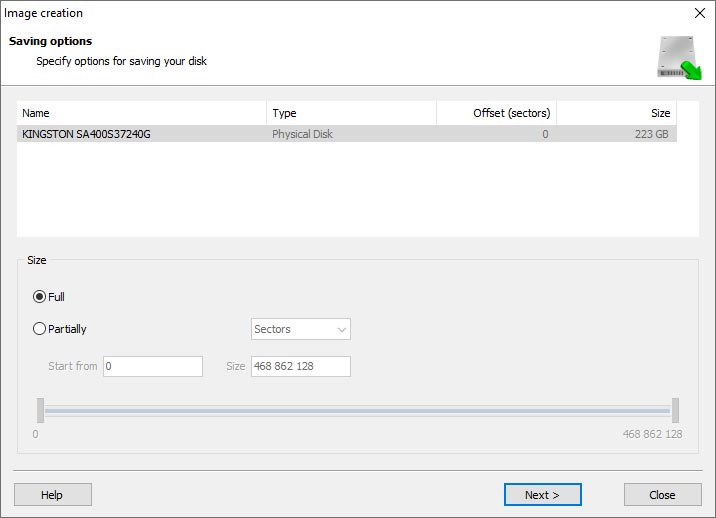
When the Image Creation Wizard opens, select whether you want to save the entire disk or only a specific region. Adjust the settings and click Next.
-
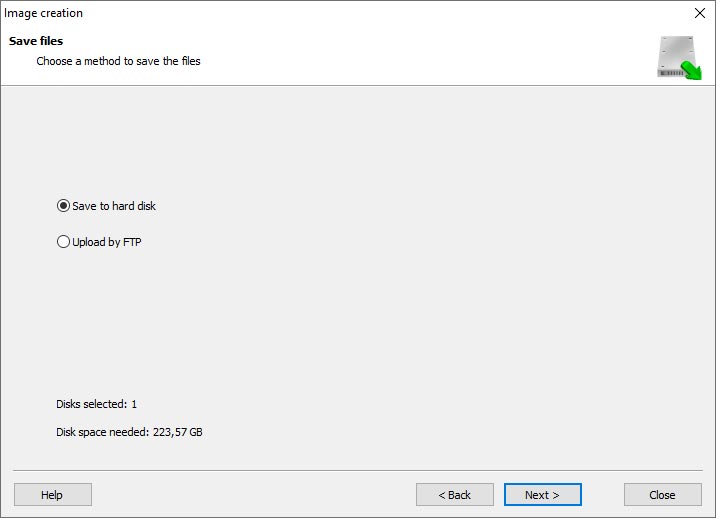
Choose the directory where the image will be saved. You may select any available disk connected to your PC or upload the image via FTP.


Where Are the User’s Files Actually Stored?
The Digiever MN-2132 Pro+ network-attached storage keeps OS Linux operating system files on a separate RAID 1 (mirrored) array. Usually, all NAS systems create several volumes on every hard disk, and the first of them takes up to 2 Gb of space. This is where operating system files are stored. Other volumes are united into a RAID array where user’s data is written.
RAID Recovery Software: Detailed Comparison
| Product | Operating system | RAID controller support | Supported file systems | Virtual RAID controller support | Data recovery from damaged RAID | File preview |
|---|---|---|---|---|---|---|
| Hetman RAID Recovery | Windows, Linux, MacOS | Yes, over 100 controllers | FAT, exFAT, NTFS, ReFS, APFS, HFS+, Ext4, Ext3, Ext2, ReiserFS, Btrfs, VMFS, Hikvision, XFS, UFS, ZFS | Yes | Yes | Yes |
| DiskInternals RAID Recovery | Windows | Yes, over 10 controllers | FAT, NTFS, Ext2/3/4, HFS+ | No | Yes | Yes |
| R-Studio | Windows, Mac, Linux | Yes, over 20 controllers | FAT, NTFS, Ext2/3/4, HFS+ | Yes | Yes | Yes |
| UFS Explorer RAID Recovery | Windows, Mac, Linux | Yes, over 100 controllers | FAT, NTFS, Ext2/3/4, HFS+ | Yes | Yes | Yes |
| EaseUS Data Recovery | Windows | Yes, over 20 controllers | FAT, NTFS, Ext2/3/4, HFS+ | No | Yes | Yes |
| ReclaiMe Free RAID Recovery | Windows | Yes, over 100 controllers | FAT, NTFS, Ext2/3/4, HFS+ | Yes | Yes | Yes |



It is possible to recover data from a physically damaged NAS Digiever MN-2132 Pro+ device, but it depends on the extent of the damage. If the damage is limited to the hardware components and the hard drives are still intact, data recovery professionals may be able to retrieve the data by repairing or replacing the damaged parts.
However, if the hard drives themselves are damaged or corrupted, the data recovery process becomes more challenging. In such cases, specialized techniques and equipment may be required to recover the data.
It is recommended to contact a professional data recovery service that specializes in NAS devices to assess the damage and determine the feasibility of data recovery. They will have the expertise and tools necessary to recover data from physically damaged devices.