How to Access Files on a RAID Disk When NAS Promise VTrak M310i is Inactive: Practical Steps

Has your NAS Promise VTrak M310i suddenly lost its network drive and you’re unsure what to do next? Did the RAID array collapse, making your files inaccessible? Is the device throwing errors during startup? Perhaps you accidentally rebuilt the RAID array or several hard drives failed at the same time?

How to Access Files on a RAID Disk When NAS Promise VTrak M310i is Inactive: Practical Steps

Promise VTrak M310i NAS Data Recovery in 2025

In this step-by-step tutorial, we’ll show you how to rebuild your RAID and recover data from an VTrak M310i. We’ll walk through the most common causes of failure and demonstrate proven methods to restore files from a lost or degraded RAID array.

How to Access Files on a RAID Disk When NAS Promise VTrak M310i is Inactive: Practical Steps

RAID Recovery™ 2.8
Recover data from damaged RAID arrays inaccessible from a computer.
Download

Why Regular Data Recovery Tools Can’t Restore Files from RAID

Conventional hard drives store user data by writing it sequentially across the disk surface, which means an entire file is typically located on a single drive. In contrast, when data is written to a RAID array, each file is split into multiple fragments. These fragments are then distributed and written in sequence across all the drives in the array. Depending on the configuration, fragment sizes can range from 2 KB to 2 MB, so every file is physically stored across several disks at once.

This approach significantly increases read and write performance — after all, writing two halves of a 1 GB file to two drives simultaneously is much faster than writing the full 1 GB to a single disk. However, this same mechanism makes file recovery far more complex.

Different RAID levels use different methods to distribute and protect data. On top of that, manufacturers like Promise often add their own proprietary structures and variations. As a result, data can be written to disks in many different formats, and each requires a specific approach during recovery.

How can continuous data protection mechanisms help in minimizing potential data loss on NAS Promise VTrak M310i devices?

Continuous data protection (CDP) mechanisms can help minimize potential data loss on NAS Promise VTrak M310i devices in several ways:

  1. Real-time data replication: CDP continuously captures and replicates data changes in real-time, ensuring that any modifications made to the data are immediately replicated to a secondary storage device. This helps to minimize the risk of data loss by providing a near-instantaneous backup of the data.
  2. Point-in-time recovery: CDP allows for point-in-time recovery, meaning that administrators can restore data to a specific point in time before a data loss event occurred. This feature is particularly useful in scenarios where data corruption or accidental deletion occurs, as it enables the recovery of data from a known good state.
  3. Granular recovery options: CDP provides granular recovery options, allowing administrators to recover individual files or folders rather than restoring the entire dataset. This granularity helps to minimize the impact of data loss by quickly recovering only the necessary data, reducing downtime and improving recovery time objectives (RTOs).
  4. Continuous backups: Unlike traditional backup methods that perform periodic backups at set intervals, CDP continuously backs up data as it changes. This ensures that even the most recent modifications are protected, minimizing the potential loss of data between backup intervals.
  5. Improved data resiliency: By providing continuous replication and point-in-time recovery capabilities, CDP enhances the overall data resiliency of NAS devices like Promise VTrak M310i. In the event of a hardware failure, data corruption, or other data loss events, CDP helps ensure that the most up-to-date copies of the data are readily available for recovery.
  6. Reduced recovery point objective (RPO): CDP mechanisms offer a significantly lower RPO compared to traditional backup methods. Since data changes are continuously captured and replicated, the RPO can be reduced to near-zero, minimizing the potential loss of data in case of a failure.

Overall, continuous data protection mechanisms provide a robust and reliable solution for minimizing potential data loss on NAS Promise VTrak M310i devices by offering real-time replication, point-in-time recovery, granular recovery options, continuous backups, improved data resiliency, and reduced RPO.

How to Remove Hard Disks from Your NAS and Connect Them to a PC

Although the NAS VTrak M310i can be accessed over the network, you still need to remove its hard disks and connect them directly to a Windows PC. Only then can the recovery software properly scan and analyze the drives. Follow these steps:

  1. Power off the NAS and disconnect it from the power source.

    WARNING! Before removing any drives, carefully read the device manual. Improper actions may damage both the NAS enclosure and the hard disks in the RAID array.

  2. Remove the hard disks one by one, gently sliding each drive out of its slot. Remember that hard disks are highly sensitive: any impact or drop can cause serious physical damage.

  3. Label each hard disk according to its position inside the NAS. The order of the drives is crucial for correct RAID reconstruction.

  4. Connect the drives to your computer. In this video, we explain which ports you can use to connect hard disks and what to do if your PC does not have enough free connectors.

    Go to view

    How to Order Remote Data Recovery

    How to Order Remote Data Recovery

Step-by-Step Data Recovery with Hetman RAID Recovery

Hetman Raid Recovery

This program restores data from damaged RAID arrays and is fully compatible with Promise VTrak M310i. Each hard disk in the array contains technical metadata describing how files were written. When launched, Hetman RAID Recovery analyzes this metadata, automatically reconstructs the damaged array, and provides access to its contents. After that, you can browse the recovered disk and save your files. The program can also restore files that were accidentally deleted from the network drive.

Go to view
How to recover data from a Promise

How to recover data from a Promise

VTrak M310i has 12 HDD slots, and it supports the following array types:

  • RAID 0;
  • RAID 1;
  • RAID 1E;
  • RAID 3;
  • RAID 5;
  • RAID 6;
  • RAID 30;
  • RAID 50;
  • RAID 60;
  • JBOD;

NAS supports:

  • exFAT, VFAT, FAT 12 / 16 / 32;
  • NTFS / ReFS;
  • APFS / HFS+;
  • Ext2 / 3 / 4 / ReiserFS / XFS / UFS / ZFS / Btrfs;
  • VMFS / HikvisionFS;

How to Safely Recover Data from Disk Images

This utility allows you to create a complete copy of a disk and work with the disk image instead of the physical drive. This approach helps protect your data from:

  • Overwriting during the recovery process;
  • Additional data loss caused by bad sectors;
  • User errors.

To create a disk image, follow these steps:

  1. Ensure you have enough free space to store the image. Its size will typically match the size of the original disk.

  2. In the main window, select the target disk and choose Tools - Save Disk. You can also select multiple disks if needed.

  3. When the Image Creation Wizard opens, select whether you want to save the entire disk or only a specific region. Adjust the settings and click Next.
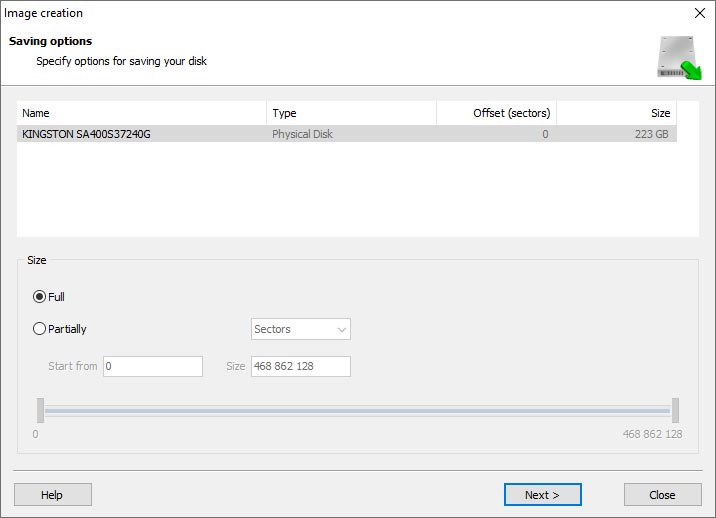
    Hetman RAID Recovery: Image Creation Wizard
  4. Choose the directory where the image will be saved. You may select any available disk connected to your PC or upload the image via FTP.
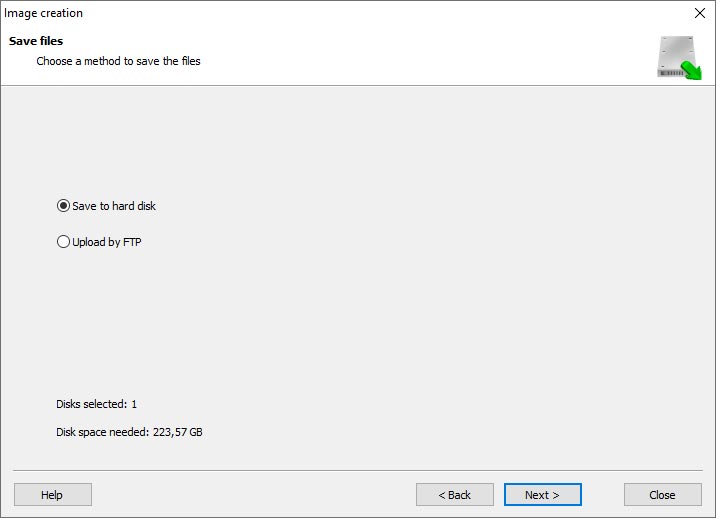
    Hetman RAID Recovery: Choose a disk or save the image via FTP

Where Are the User’s Files Actually Stored?

The Promise VTrak M310i network-attached storage keeps OS Linux operating system files on a separate RAID 1 (mirrored) array. Usually, all NAS systems create several volumes on every hard disk, and the first of them takes up to 2 Gb of space. This is where operating system files are stored. Other volumes are united into a RAID array where user’s data is written.

RAID Recovery Software: Detailed Comparison

Product Operating system RAID controller support Supported file systems Virtual RAID controller support Data recovery from damaged RAID File preview
Hetman RAID Recovery Windows, Linux, MacOS Yes, over 100 controllers FAT, exFAT, NTFS, ReFS, APFS, HFS+, Ext4, Ext3, Ext2, ReiserFS, Btrfs, VMFS, Hikvision, XFS, UFS, ZFS Yes Yes Yes
DiskInternals RAID Recovery Windows Yes, over 10 controllers FAT, NTFS, Ext2/3/4, HFS+ No Yes Yes
R-Studio Windows, Mac, Linux Yes, over 20 controllers FAT, NTFS, Ext2/3/4, HFS+ Yes Yes Yes
UFS Explorer RAID Recovery Windows, Mac, Linux Yes, over 100 controllers FAT, NTFS, Ext2/3/4, HFS+ Yes Yes Yes
EaseUS Data Recovery Windows Yes, over 20 controllers FAT, NTFS, Ext2/3/4, HFS+ No Yes Yes
ReclaiMe Free RAID Recovery Windows Yes, over 100 controllers FAT, NTFS, Ext2/3/4, HFS+ Yes Yes Yes

Feedback

We will be happy to answer your questions!

Comments (3)

  • Hetman Software: Data Recovery
    Hetman Software: Data Recovery 9.08.2022 12:31 #
    If you want to ask a question about data recovery, from NAS VTrak M310i, feel free to leave a comment!
  • Duane Ledger
    Duane Ledger 8.09.2023 19:48 #
    Can data recovery from a NAS Promise VTrak M310i device be done if the device is showing signs of firmware or software bugs?
    • Hetman Software
      Hetman Software 8.09.2023 19:59 #

      Yes, data recovery from a NAS Promise VTrak M310i device can still be possible even if the device is showing signs of firmware or software bugs. However, it is important to note that the success of data recovery depends on the severity of the bugs and the specific circumstances.

      In such cases, it is recommended to contact a professional data recovery service that specializes in NAS devices. They have the expertise and specialized tools to diagnose and recover data from faulty NAS devices. They can also work with the manufacturer or utilize advanced techniques to bypass firmware or software bugs and retrieve the data.

      It is important to stop using the device immediately to prevent further damage or data loss. Trying to fix the bugs or recover data without proper knowledge and expertise may lead to permanent data loss.

Post comment
User
Leave a reply(Duane Ledger).Cancel reply
Your email address will not be published. Required fields are marked *

Vladimir Artiukh

Author: Vladimir Artiukh, Technical Writer

Vladimir Artiukh is a technical writer for Hetman Software, as well as the voice and face of their English-speaking YouTube channel, Hetman Software: Data Recovery for Windows. He handles tutorials, how-tos, and detailed reviews on how the company’s tools work with all kinds of data storage devices.

Oleg Afonin

Editor: Oleg Afonin, Technical Writer

Oleg Afonin is an expert in mobile forensics, data recovery and computer systems. He often attends large data security conferences, and writes several blogs for such resources as xaker.ru, Elcomsoft and Habr. In addition to his online activities, Oleg’s articles are also published in professional magazines. Also, Oleg Afonin is the co-author of a well-known book, Mobile Forensics - Advanced Investigative Strategies.

Share

Questions and answers

  • What are the key features and capabilities of the NAS Promise VTrak M310i that make it suitable for use in a surveillance system?

    The NAS Promise VTrak M310i is a storage solution specifically designed for use in surveillance systems. It offers several key features and capabilities that make it suitable for this purpose:

    1. High storage capacity: The VTrak M310i can support up to 192 TB of raw storage capacity, providing ample space to store large amounts of surveillance footage.
    2. Scalability: It supports expansion up to 384 TB, allowing for future growth and the addition of more cameras or longer retention periods.
    3. High performance: The VTrak M310i is equipped with high-speed SAS (Serial Attached SCSI) drives, ensuring fast and reliable data access. It also supports RAID configurations for enhanced performance and data protection.
    4. Redundancy and data protection: It offers various RAID levels (including RAID 5, 6, and 10) to protect against drive failures and ensure data integrity. Hot-swappable drive trays allow for easy replacement of failed drives without system downtime.
    5. Advanced data management: The VTrak M310i supports features like thin provisioning, which allows for efficient storage allocation and utilization. It also offers snapshot and replication capabilities for data backup and disaster recovery purposes.
    6. Network connectivity: It supports multiple network protocols such as iSCSI and NFS, enabling easy integration into existing surveillance systems and compatibility with various video management software.
    7. High availability: The VTrak M310i is designed for 24/7 operation, with redundant power supplies and cooling fans to ensure uninterrupted operation even in demanding surveillance environments.
    8. Easy management: It includes a user-friendly management interface that allows for easy configuration, monitoring, and maintenance of the storage system. It also supports remote management for convenient access and control.

    Overall, the NAS Promise VTrak M310i offers high storage capacity, scalability, performance, data protection, advanced data management features, network connectivity, high availability, and easy management, making it a suitable choice for use in surveillance systems.

  • How does the NAS Promise VTrak M310i ensure data security and reliability for surveillance footage storage?

    The NAS Promise VTrak M310i ensures data security and reliability for surveillance footage storage through several features and mechanisms:

    1. Redundant Array of Independent Disks (RAID): The VTrak M310i supports various RAID configurations, such as RAID 0, 1, 5, 6, and 10. RAID provides data redundancy and protection against drive failures by distributing data across multiple drives.
    2. Hot-Swappable Drives: The system allows for hot-swapping of drives, which means that if a drive fails, it can be replaced without shutting down the system or interrupting the data storage process. This ensures continuous operation and minimizes downtime.
    3. Data Scrubbing and Error Correction: The VTrak M310i performs regular data scrubbing, which involves checking and correcting any errors in stored data. This process helps to maintain data integrity and reliability over time.
    4. Snapshot and Replication: The system supports snapshot and replication capabilities, allowing for the creation of point-in-time copies of data and replication to remote locations. This ensures data availability and protection against data loss or corruption.
    5. Data Encryption: The VTrak M310i supports data encryption, which ensures that the stored surveillance footage is protected from unauthorized access. Encryption algorithms are used to encode the data, making it unreadable without the appropriate decryption key.
    6. Access Control and Authentication: The system provides access control mechanisms to restrict unauthorized access to the stored data. User authentication methods, such as username/password or integration with existing authentication systems, ensure that only authorized personnel can access the surveillance footage.
    7. Redundant Power Supplies and Cooling: The VTrak M310i is equipped with redundant power supplies and cooling mechanisms to ensure continuous operation and prevent hardware failures due to power or thermal issues.
    8. Monitoring and Alerting: The system includes monitoring and alerting features that notify administrators about any potential issues or failures. This allows for proactive maintenance and timely resolution of problems, ensuring data reliability.

    Overall, the NAS Promise VTrak M310i incorporates various data protection, redundancy, and security features to ensure the reliability and security of surveillance footage storage.

  • Can you provide examples of successful implementations of the NAS Promise VTrak M310i in surveillance systems, and the benefits achieved in terms of storage capacity, performance, and cost-efficiency?

    While I cannot provide specific examples of successful implementations of the NAS Promise VTrak M310i in surveillance systems, I can explain the potential benefits that can be achieved in terms of storage capacity, performance, and cost-efficiency.

    1. Storage Capacity: The Promise VTrak M310i is a network-attached storage (NAS) solution that supports up to 16 hard drives, allowing for significant storage capacity. With the use of high-capacity drives, surveillance systems can store large amounts of video footage for extended periods without worrying about running out of space.
    2. Performance: The VTrak M310i is designed to deliver high-performance storage for demanding applications. It supports various RAID configurations, including RAID 0, 1, 5, 6, 10, 50, and 60, which provide different levels of performance and data protection. By configuring the NAS with appropriate RAID levels, surveillance systems can achieve optimal performance for video recording and retrieval.
    3. Cost-efficiency: The VTrak M310i offers cost-efficiency through its scalability and flexibility. As surveillance systems grow and require additional storage capacity, the NAS can be easily expanded by adding more hard drives. This scalability allows organizations to start with a smaller storage capacity and gradually increase it as needed, reducing upfront costs. Additionally, the use of RAID technology ensures data redundancy and protection, minimizing the risk of data loss and potential costs associated with data recovery.

    Overall, the NAS Promise VTrak M310i can provide surveillance systems with ample storage capacity, high-performance storage, and cost-efficiency through its scalability and data protection features.